1. AWS Compute Overview
Professional-level design questions expect you to remember that “compute” isn’t just EC2 boxes. AWS provides a toolkit and expects architects to combine pieces that best fit the workload’s shape.
- Virtual servers (EC2) – still the go-to when full OS control, custom AMIs, or exotic networking is required.
- Containers (ECS, EKS, Fargate) – great for repeatable deployments and for sprinkling Spot capacity into stateless services.
- Serverless functions (Lambda) – perfect glue for events and bursty jobs because idle time literally costs nothing.
- Edge + load balancing – Route 53, CloudFront, ALB/NLB/GWLB, and Global Accelerator decide where the traffic lands and how TLS is handled.
- Fleet automation – Auto Scaling Groups, launch templates, Parameter Store, and Systems Manager keep fleets patched without manual babysitting.
The remaining sections follow a logical progression: start with regional entry points, cover cost levers, tighten up networking, then finish with scaling and inline security.
2. Regional and Global Architecture
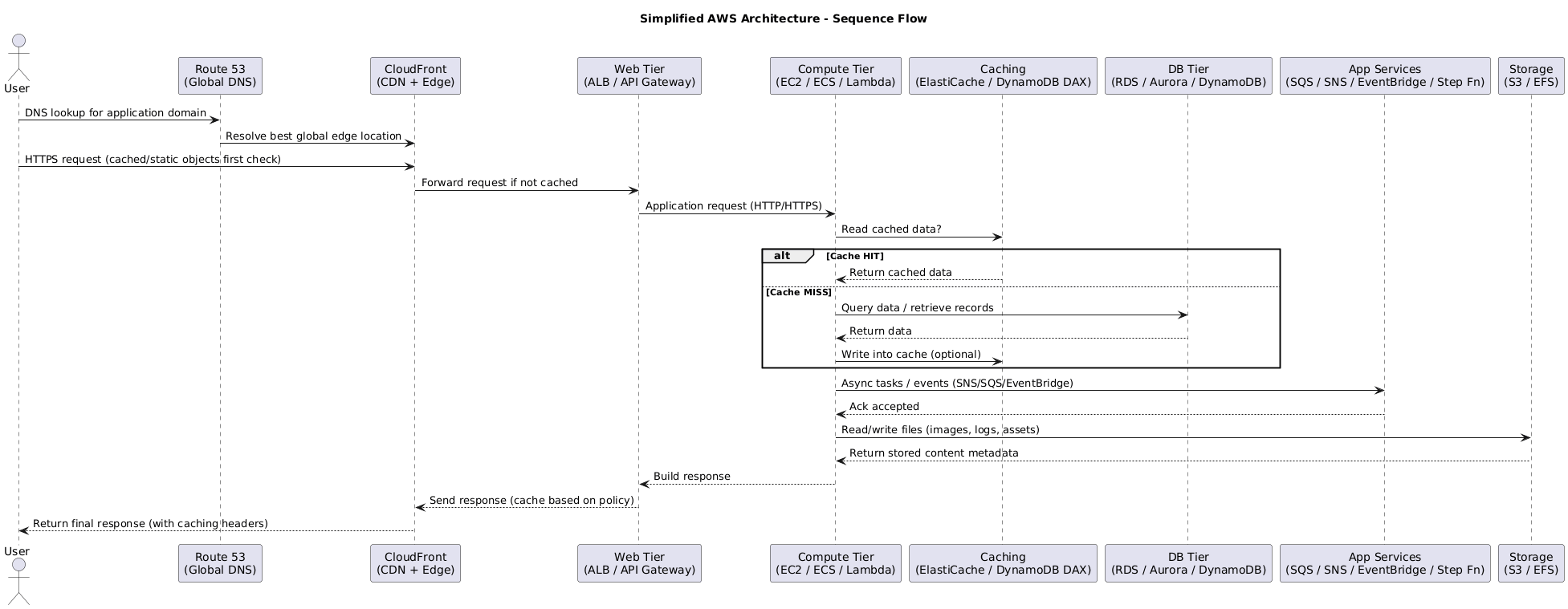
High-level designs usually start at the regional entry point and then trace how traffic fans out globally. Key checkpoints:
- Global reach – place workloads close to customers via Regions, edge locations, and CDN nodes.
- Health-aware routing – global health checks and failover policies keep endpoints resilient.
- Scalable ingress – use regional load balancers or Global Accelerator to absorb demand before it reaches your apps.
- Content acceleration – pair compute tiers with CloudFront so static and dynamic responses stay fast worldwide.
3. EC2 Purchase & Savings Strategies
After the region/edge layout is clear, cost strategy becomes the next focus. Picking the right commercial model matters just as much as sizing instances, so the tables below act as a quick reference for when each option shines.
3.1 Standard Purchase Options
| Model | Billing Traits | Best For | Key Watchouts |
|---|---|---|---|
| On-Demand | Per-second billing on shared hardware, no commitments. | Default choice for short-lived, unpredictable, or interruption-intolerant tasks. | Most expensive rate; capacity not reserved. |
| Spot | Per-second billing, deep discounts (up to ~90%) on unused capacity. | Stateless, batch, or flexible jobs that can handle sudden interruptions. | Instances can disappear with little warning; design retry logic. |
| Reserved Instances | Commit to 1 or 3 years for reduced hourly rates; zonal RIs also reserve capacity. | Always-on workloads with predictable instance families/regions. | Locked to attributes (region, tenancy, family). Unused reservations still bill. |
3.2 Dedicated Capacity Choices
| Option | What You Get | Ideal Use | Notes |
|---|---|---|---|
| Dedicated Host | Entire physical server under your control; BYOL-friendly. | Socket/core-licensed software, strict compliance, pinning instances. | You manage host capacity; pair with Host Affinity for placement guarantees. |
| Dedicated Instance | Instance runs on hardware isolated to your account, but AWS manages hosts. | Isolation requirements without host-level management. | No host visibility; pay instance fees with dedicated tenancy surcharge. |
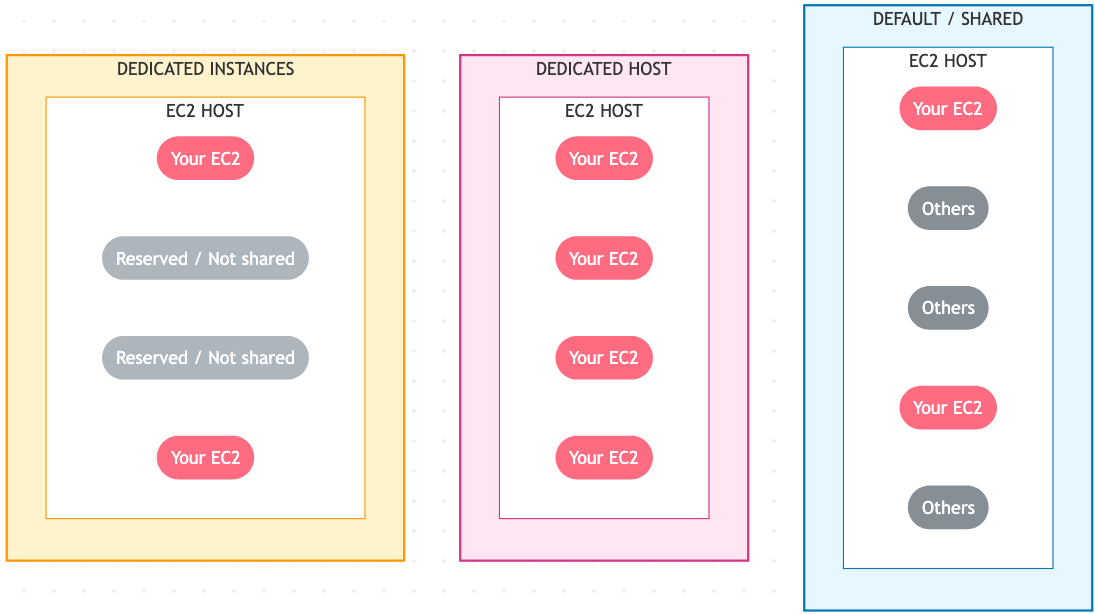
Quick note to future me: a host is the single physical server that runs the VMs, while a rack is the collection of hosts an AWS placement group carves up.
3.3 Reserved Instance Flavors
- Scheduled RIs – Reserve recurring blocks (e.g., nightly batch for 5 hours). Minimum 1-year contract (~1,200 hrs/year). Not every region or family supported.
- Regional RIs – Apply discounts to matching instances in any AZ of the region, but do not reserve capacity.
- Zonal RIs – Attach to one AZ; gain both billing discount and capacity reservation.
- On-Demand Capacity Reservations – Guarantee capacity inside an AZ without term commitments. Pair with RIs or Savings Plans for discounts when possible.
3.4 Savings Plans
- Commit to spend $X/hour for 1 or 3 years to unlock reduced rates.
- Compute Savings Plans apply across EC2, Fargate, and Lambda, regardless of instance family or region.
- EC2 Instance Savings Plans limit flexibility (family + region) but offer deeper discounts.
3.5 Taxi Analogy for Charging Models
| Plan | Plain-English Explanation | Taxi Analogy 🚕 | Commitment | Capacity Guaranteed? | Discount? | When to Use |
|---|---|---|---|---|---|---|
| On-Demand | Pay only while the instance runs. | Hail a taxi whenever needed. | None | ❌ | ❌ | Tests, spikes, unpredictable workloads. |
| Savings Plan | Promise to spend $/hr for discount, flexible usage. | Retainer for any taxi ride at lower price. | 1–3 yrs | ❌ | ✅ | Continuous usage that may change families/regions. |
| Reserved Instance | Lock specific attributes for big discount. | Lease the same taxi full-time. | 1–3 yrs | ❌ (✅ for zonal) | ✅ | Steady 24×7 fleets. |
| Scheduled RI | Recurring reserved blocks. | Pre-book the same taxi for rush hour. | 1 yr | ✅ (during window) | ✅ | Predictable periodic jobs. |
| Capacity Reservation | Keep capacity idle but ready. | Pay driver to wait while you shop. | Open-ended | ✅ | ❌ (unless paired) | Mission-critical or DR kickoffs. |
3.6 Dedicated Options Recap
| Option | Analogy | Discount Potential | Why choose it |
|---|---|---|---|
| Dedicated Instance | Private taxi, company-owned. | ❌ | Compliance isolation without hardware management. |
| Dedicated Host | Lease the whole car. | ✅ (with RIs/SP) | BYOL licensing, socket/core tracking, placement control. |
4. EC2 Networking & Image Strategy
Cost planning is pointless if instances can’t talk or boot quickly, so the next pass is all about ENIs and image hygiene.
4.1 Elastic Network Interfaces (ENIs)
- Scoped to an AZ: an ENI lives in a subnet, so you can only attach it to instances in the same AZ.
- Static identity: primary private IPv4 never changes for the lifetime of the ENI.
- Addresses: support multiple secondary IPv4s, IPv6 assignments, and an Elastic IP per private IPv4 if needed.
- Security constructs: attach multiple security groups, leverage source/destination checks, and gain a unique MAC address (handy for licensed software).
- Attachment patterns: add multiple ENIs per instance (subject to type limits) for different security zones or management planes.
4.2 Bootstrapping vs. AMI Baking
Application provisioning typically follows three layers:
- Base OS + Dependencies – slowest layer, rarely changes.
- Application Binaries – updated occasionally.
- Runtime Configuration – fast, environment-specific tweaks.
Strategies:
- User Data scripts – customize step 1 or 2 at launch time; flexible but slower to become ready.
- AMI Baking – pre-build golden images with the heavy lifting done; fastest boot but requires pipeline updates when components change.
- Dynamic config (Parameter Store / AppConfig) – keep step 3 lightweight and environment-aware.
Optimal builds usually blend baked AMIs for heavy dependencies plus minimal bootstrapping for secrets, region settings, or last-minute patches.
5. Elastic Load Balancing
With networking squared away, the next layer is the load balancers that shape every request before it hits compute.
5.1 Architecture & Traffic Flow
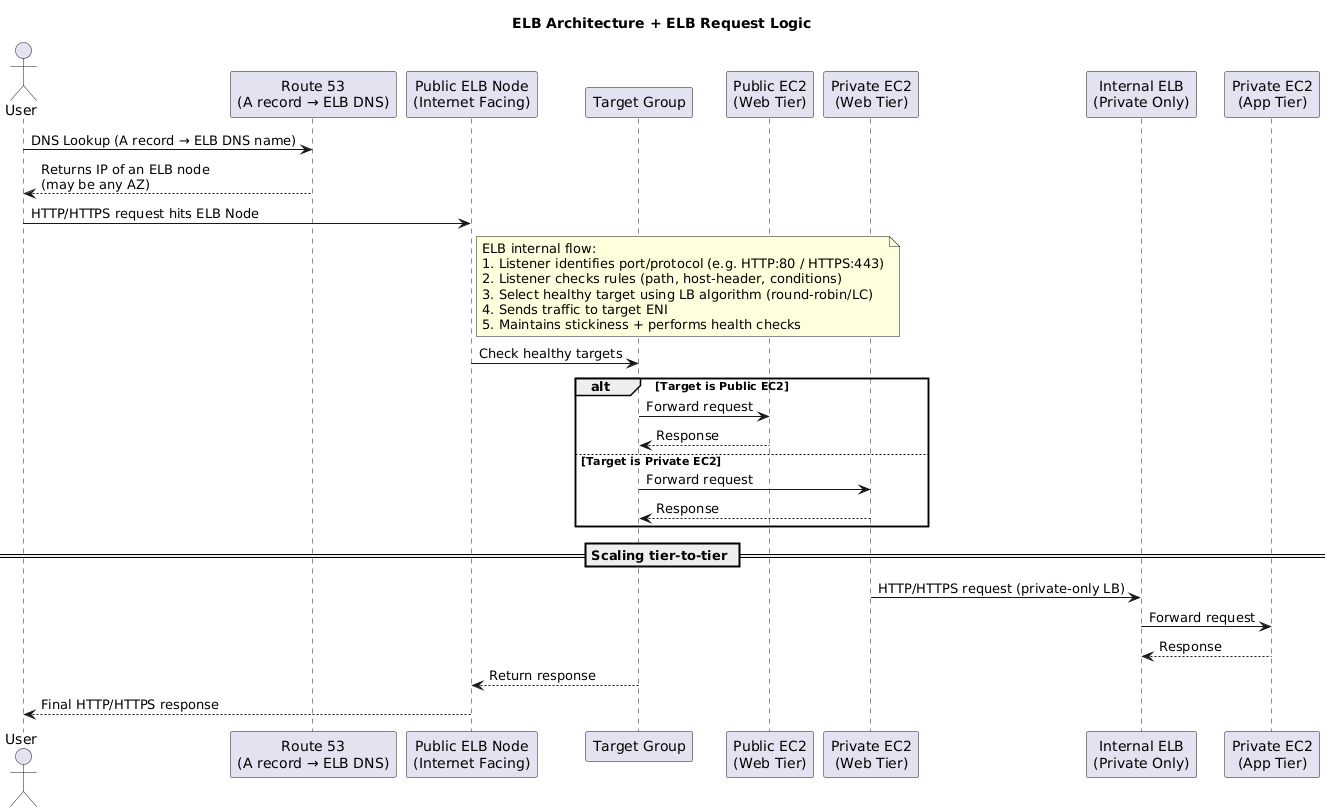
- Deploy load balancers across at least two subnets (one per AZ) to decouple presentation and application tiers.
- Each ELB exposes a DNS name; clients resolve it to per-AZ nodes.
- Listeners inspect protocol, port, and rule sets, then forward to target groups over private networking.
- Targets respond via the node, while health checks continuously verify status.
- Allocate /27-sized subnets (8+ free IPs) so nodes can scale out when demand spikes.
5.2 Cross-Zone Load Balancing
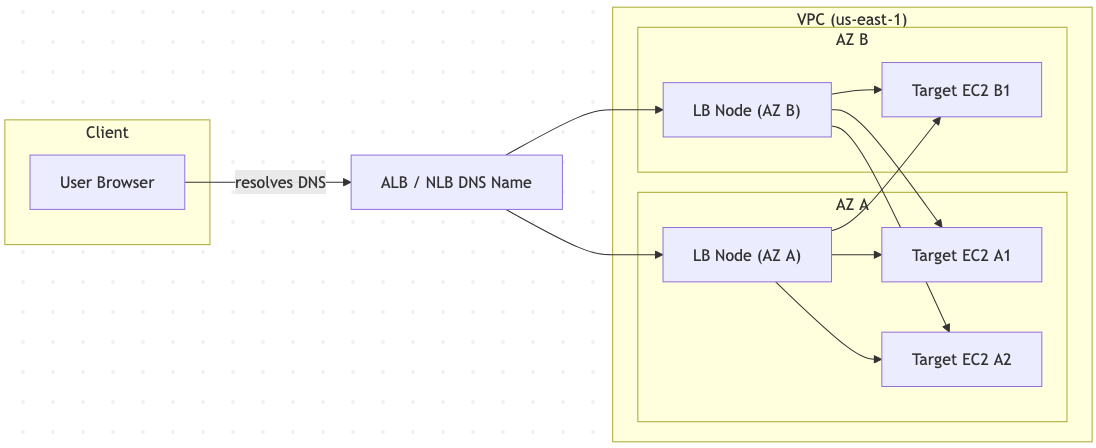
- Default behavior is per-AZ balancing – each AZ receives an equal portion of traffic regardless of how many instances run inside it.
- Enable cross-zone to redistribute surplus requests from lightly provisioned AZs to others, preventing single-instance AZs from being overloaded.
5.3 User Session State
- Stateful features (shopping carts, wizards, login state) should ideally live in shared stores (Redis, DynamoDB) so any node can serve the next request.
- If server memory must hold state, use stickiness cautiously and plan for disruption during instance rotations.
5.4 Load Balancer Generations
| Type | Protocols | Highlights | Limitations |
|---|---|---|---|
| Classic LB (CLB) | HTTP/HTTPS/TCP | Legacy option, basic Layer 4/7 support. | No SNI, only one SSL cert, minimal app awareness. |
| Application LB (ALB) | HTTP/HTTPS/WebSocket | True Layer 7: content-based routing, multiple certs, WebSockets. | No TCP/UDP listeners; TLS terminates at ALB. |
| Network LB (NLB) | TCP/TLS/UDP | Ultra-low latency, static IPs, preserves end-to-end encryption. | No HTTP header visibility or cookies. |
| Gateway LB (GWLB) | GENEVE encapsulated L3/L4 | Auto-scales third-party appliances inline. | Requires appliance support for GENEVE. |
5.5 Session Stickiness
- ALB/CLB can inject cookies (e.g.,
AWSALB) lasting 1 second to 7 days to bind a client to a target. - Stickiness helps when external caching isn’t available but can skew load or trap users on draining instances.
5.6 Connection Draining & Deregistration Delay
- Connection Draining (CLB) – allows 1–3600 seconds for in-flight requests to finish before removing a node.
- Deregistration Delay (ALB/NLB) – configured per target group (default 300s) so existing flows complete gracefully after a scale-in event.
5.7 Client IP Preservation
- For HTTP/HTTPS, ALB adds
X-Forwarded-For,X-Forwarded-Proto, andX-Forwarded-Portheaders; read the leftmost IP to find the original client. - For non-HTTP traffic, enable the Proxy Protocol (Layer 4). CLB uses v1 (text), NLB uses v2 (binary) to deliver client source info while keeping TLS intact.
6. Auto Scaling Groups (ASG)
All that front-door engineering falls flat without an automated fleet, so this section collects focused ASG reminders.
6.1 Core Concepts
- Use launch templates (preferred) or launch configurations to define AMI, networking, storage, and metadata.
- Set min, desired, and max capacity to bound fleet size.
- ASGs self-heal: failed instances trigger replacement up to desired capacity.
- Operate only inside a VPC but can span multiple subnets/AZs for resilience.
6.2 Scaling Policies
- Manual – operators change desired count directly (no policy required).
- Scheduled – scale for predictable daily/weekly events.
- Dynamic – react to CloudWatch metrics:
- Simple scaling: single threshold → fixed adjustment.
- Step scaling: multiple thresholds map to incremental adjustments.
- Target tracking: maintain a metric near a setpoint (thermostat-style).
- SQS-driven – trigger scaling from queue depth (e.g.,
ApproximateNumberOfMessagesVisible). - Cooldowns prevent thrashing; customize per policy.
TARGET_CPU = 50

while True:
    avg = get_average_cpu(asg_instances)
    error = avg - TARGET_CPU

    if error > 10 and desired_instances < max_instances:
        scale_out(by=1)
    elif error < -10 and desired_instances > min_instances:
        scale_in(by=1)

    cooldown(120)
    sleep(60)
| Policy | Behavior | Notes |
|---|---|---|
| Simple | One metric threshold, one action. | “If CPU > 70%, add 1 instance.” |
| Step | Multiple bands with different step sizes. | “>90% add 3, >70% add 2…” |
| Target Tracking | Feedback loop aims for target metric. | Works like cruise control; AWS manages math. |
6.3 Health Checks & Hooks
- Health sources: EC2 status (default), ELB health, or custom integration.
- Grace period: default 300s before first health check to allow bootstrapping.
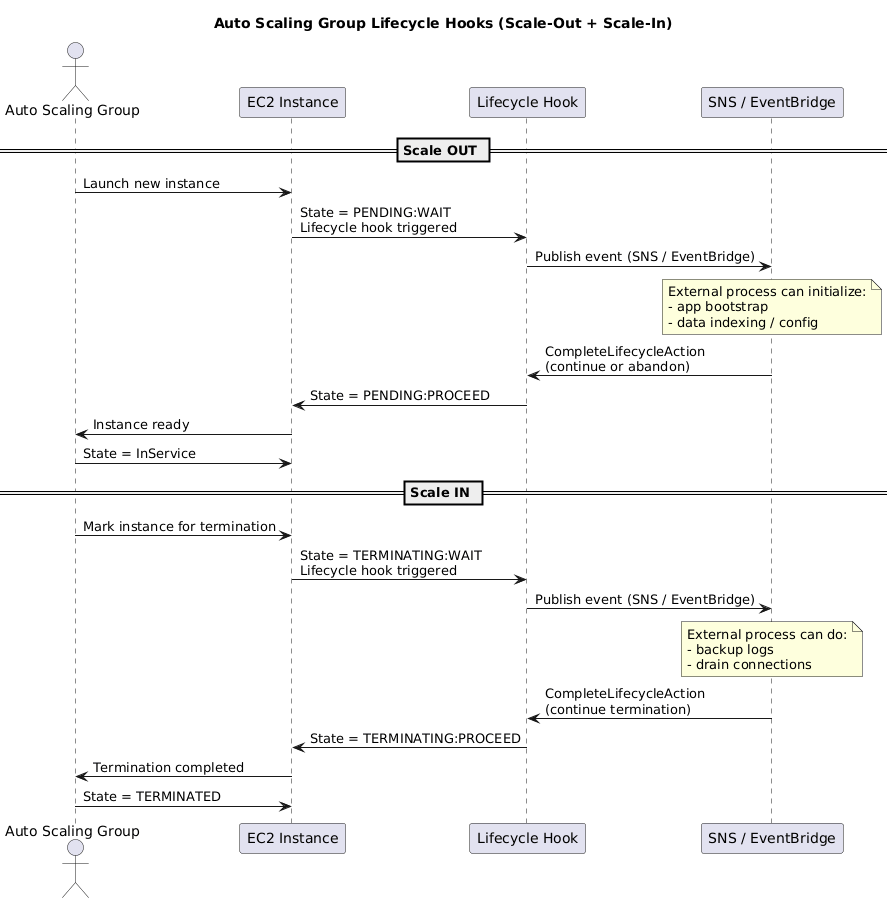
- Lifecycle hooks pause instances during
PendingorTerminatingsteps so you can run custom scripts (e.g., pre-warm cache, drain sessions). Resume viaCompleteLifecycleActionor wait for timeout.
6.4 ASGs with Load Balancers
- Register ASG with target groups; new instances join automatically.
- Optionally rely on load balancer health checks so failing targets are replaced even if EC2 reports “ok.”
- Deregistration delays + lifecycle hooks create graceful scale-in workflows.
7. EC2 Placement Groups
When latency or blast-radius guarantees show up, placement groups keep the topology honest.
| Strategy | Layout | Best For | Constraints |
|---|---|---|---|
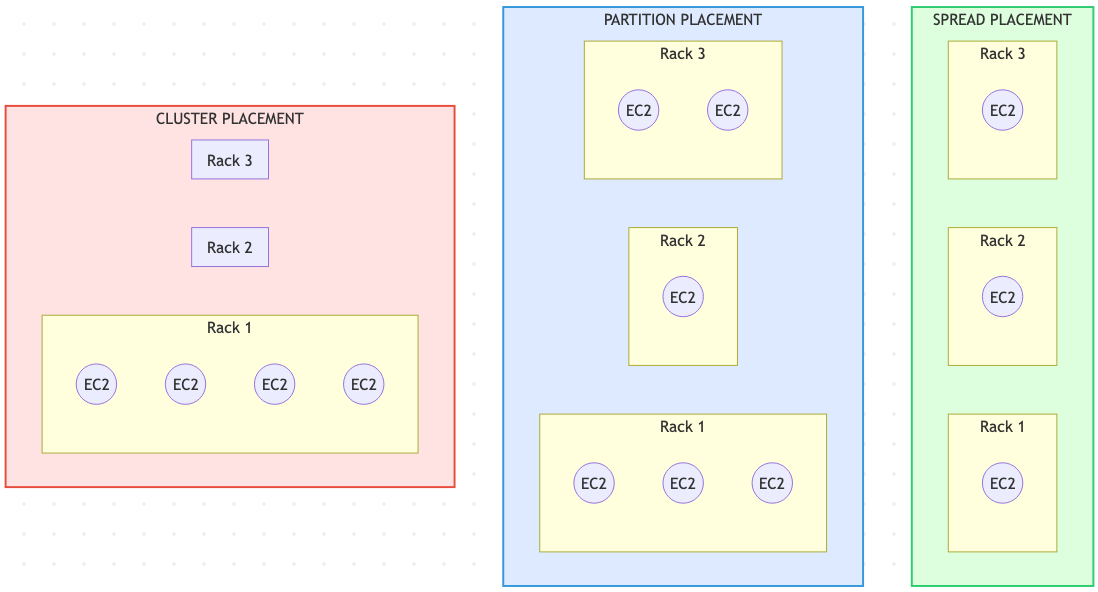
| Cluster | Packs instances close together in one AZ. | HPC, tightly coupled apps needing 10 Gbps+ per flow. | No cross-AZ spreading; low resilience. Launch similar instances simultaneously for best results. |
| Spread | Places up to 7 instances per AZ on distinct racks with separate power/network. | Small fleets needing maximum isolation (critical services, HA pairs). | Not available for Dedicated Hosts/Instances; limit 7 per AZ. |
| Partition | Segments racks into partitions; instances within a partition share hardware, but partitions are isolated. | Large-scale distributed systems (Hadoop, Cassandra, Kafka). | Up to 7 partitions per AZ; you assign instances to partitions for failure-domain control. |
8. Gateway Load Balancer (GWLB)
The final piece is inline security. GWLB keeps third-party appliances elastic so next hops are not hard-coded everywhere.
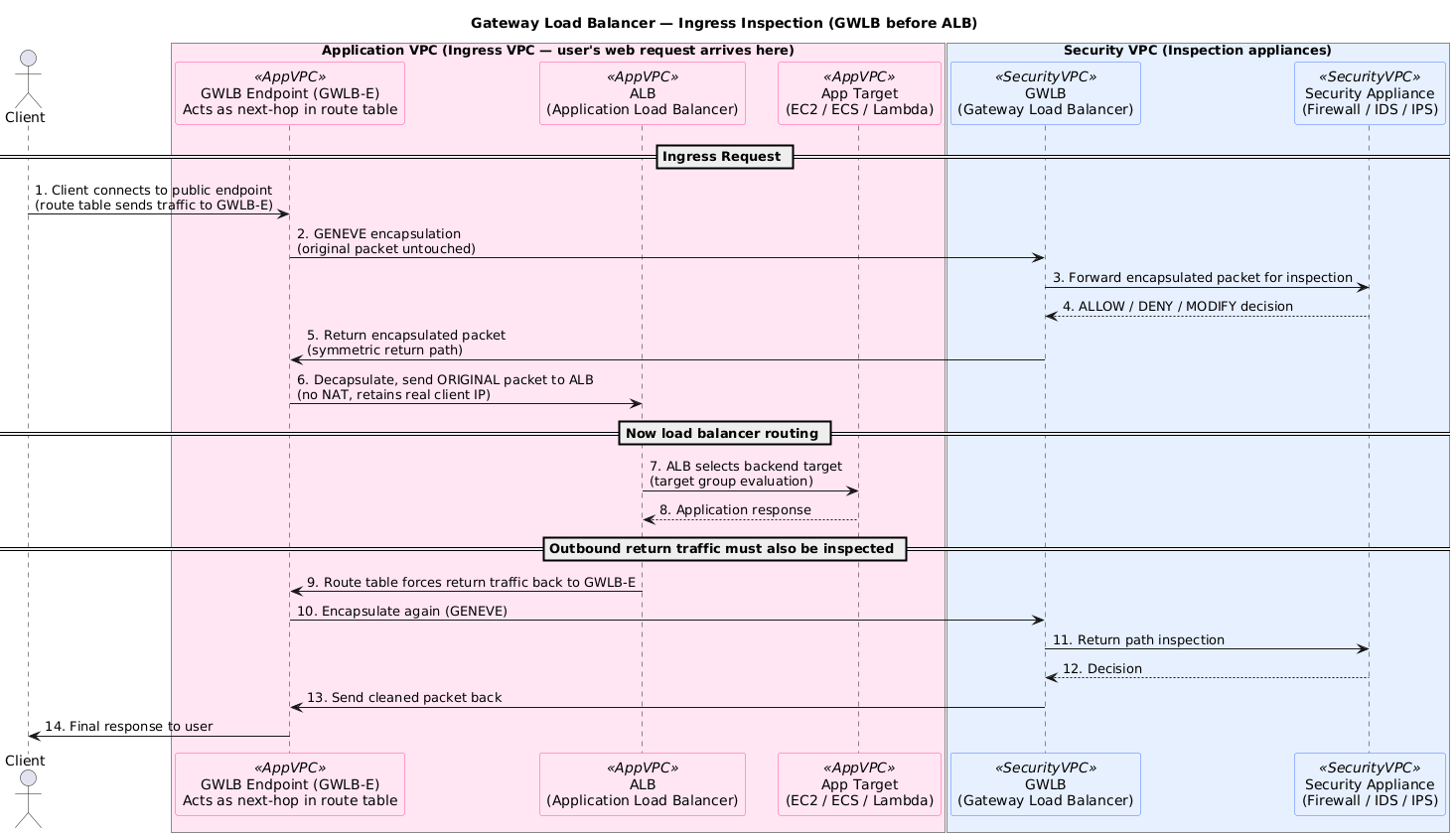
Traditional inspection tiers often require manually chaining firewalls or IDS appliances, creating scaling pain. GWLB changes that by:
- Planting GWLB Endpoints (PrivateLink) inside each subnet, so routing can hairpin through inspection with a single hop.
- Wrapping flows in GENEVE and shipping them to a managed GWLB service that knows about health, scaling, and AZ isolation.
- Treating appliance fleets like any other target group, which means health checks, scaling, and fail-open/fail-closed logic stay consistent.
- Preserving the original source/destination IPs so the security rules stay accurate after inspection.
Use cases:
- Centralized security VPC – route spoke VPC traffic via GWLB endpoints for inspection before reaching workloads.
- Inline egress filtering – send outbound flows through IDS/IPS without hard-wiring next hops.
- Scalable appliances – autoscale firewall AMIs with GWLB controlling attachment and health.
8. Operations & Exam Notes
- EC2 lifecycle – Reboot keeps the same host and IPs; Stop/Start moves to new hardware with a new public IP (unless EIP) and wipes instance store volumes.
- ENIs – secondary ENIs retain MAC/IP identity across stops; useful for licensing or failover IP swaps.
- ALB refresh – regional service with nodes (ENIs) in each subnet; stickiness is configured at the Target Group, not on the listener.
- Lambda@Edge – deploys Lambda functions to CloudFront PoPs for viewer/origin request/response manipulation (auth headers, redirects, AB tests).
- ECS networking modes –
bridge(containers NAT behind host) vsawsvpc(task receives its own ENI, required for Fargate/Service Discovery). - Systems Manager Run/Session Manager – requires SSM Agent plus the
AmazonSSMManagedInstanceCorerole and VPC endpoints (ssm,ec2messages,ssmmessages) when no Internet access. - Elastic Beanstalk deployments – All-at-once (downtime), Rolling, Rolling with extra batch, Immutable, or Blue/Green (CNAME swap). Worker environments use SQS + EC2.
- Elastic Fabric Adapter (EFA) – HPC ENI with OS-bypass (Libfabric). Needs supported instances (e.g., c5n, p4d, hpc6a) + placement group + EFA-enabled AMI.
- Spot Fleet – mix On-Demand and Spot; set baseline On-Demand, choose allocation strategy (lowest price/diversified/capacity-optimized) to hit target capacity at lower cost.
- Lambda concurrency – Regions allow bursts from hundreds up to tens of thousands; request service quota increases for sustained concurrency.