1. Storage Building Blocks
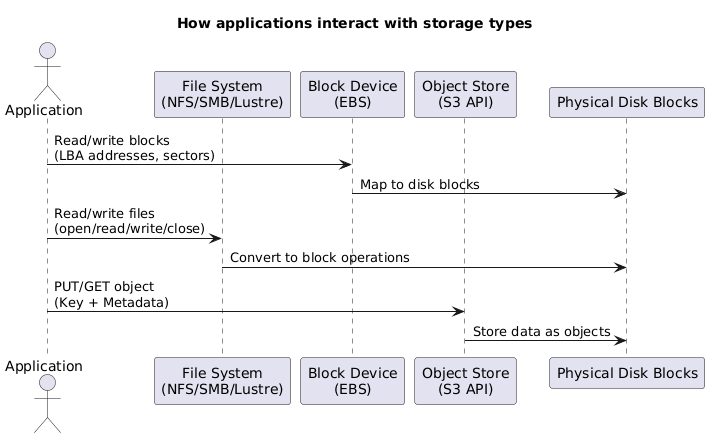
AWS exposes storage through three primary layers. Understanding how each layer writes to blocks helps when selecting the right service or designing migration paths.
| Layer | What It Exposes | How It Writes | Effect on Blocks |
|---|---|---|---|
| Block Device | Logical block addresses (LBA 0…n) | Direct I/O; write a 4 KB block at a time. | Overwrites the block exactly as requested; no metadata awareness. |
| File System | Files, directories, inodes, and metadata. | Splits files into metadata + data blocks. | Blocks interleave metadata and file payloads. |
| Object Store | Object = key + metadata + blob. | Stores metadata in an index, data in hidden chunks. | Objects fan out across multiple block devices; layout abstracted. |
2. Managed File Services
AWS offers several turnkey file systems so lift-and-shift workloads do not require hand-built EC2 clusters. The three most common services cover Windows shares, HPC Lustre clusters, and general-purpose NFS for Linux.
2.1 Amazon FSx for Windows File Server
- Presents fully managed SMB shares with native Windows semantics (NTFS ACLs, SMB dialects, DFS Namespaces).
- Supports Volume Shadow Copy Service (VSS) so users can self-serve file-level restores.
- Integrates with self-managed Active Directory or AWS Managed Microsoft AD; you keep ownership of the domain join.
- Delivers multi-AZ scale-out options and the ability to lift traditional Windows file server workloads without standing up EC2 hosts.
2.2 Amazon FSx for Lustre
- Purpose-built for Linux HPC workloads needing 100s of GB/s throughput and sub-millisecond latency.
- Two deployment modes:
- Scratch: no replication, temporary storage, 200 MB/s per TiB baseline; best for ephemeral HPC runs.
- Persistent: 50/100/200 MB/s per TiB baseline with intra-AZ replication and auto-healing.
- Metadata lives on Metadata Targets (MSTs); object data spreads across Object Storage Targets (OSTs).
- Minimum size 1.2 TiB (then 2.4 TiB increments). Larger filesystems add servers/disks for parallelism.
- Seamless S3 integration: link to an S3 bucket, lazily load objects into the file system, archive back to S3 via
hsm_archive, and keep 0–35 day backups in S3.
2.3 Amazon Elastic File System (EFS)
- Managed NFSv4 storage for Linux instances (EC2, on-prem via DX/VPN).
- Mount targets expose private IPs per subnet/AZ; traffic never traverses the public internet.
- Supports POSIX permissions, security groups, and access via multiple instances simultaneously.
- Performance modes:
- General Purpose – low-latency workloads.
- Max I/O – higher aggregate throughput and open file counts.
- Throughput modes:
- Bursting – scales with filesystem size.
- Provisioned – fixed MB/s regardless of stored data.
- Storage classes: Standard and Infrequent Access (IA) with lifecycle policies moving cold files automatically.
3. Amazon S3 Core Concepts
Simple Storage Service underpins most AWS architectures. The focus areas below keep cost, durability, and replication under control.
3.1 Cost Model
S3 charges on three levers: storage (GB-month), requests (per 1,000 API calls), and data transfer out (per GB). Choosing the right storage class, lifecycle rules, and replication strategy is how to keep those levers predictable.
3.2 Storage Classes
| Class | Durability & Availability | Retrieval | Minimums | Best For |
|---|---|---|---|---|
| Standard | 11 nines durability, multi-AZ availability. | Milliseconds, no retrieval fee. | None. | Hot data, frequently accessed, mission critical. |
| Standard-IA | Multi-AZ, same durability. | Milliseconds, per-GB retrieval fee. | 30-day storage; 128 KB minimum charge. | Long-lived but infrequently accessed data. |
| One Zone-IA | Single AZ (cost optimized). | Milliseconds, per-GB retrieval fee. | 30-day storage; 128 KB minimum charge. | Re-creatable data that can tolerate AZ loss. |
| Glacier Instant Retrieval | Multi-AZ durability. | Milliseconds, higher retrieval fee. | 90-day storage minimum. | Quarterly access patterns with instant retrieval needs. |
| Glacier Flexible Retrieval | Multi-AZ, cold archive. | Minutes to hours per retrieval job. | 90-day storage minimum. | Archival data; bulk retrievals acceptable. |
| Glacier Deep Archive | Multi-AZ, lowest cost. | 12–48 hours. | 180-day storage minimum. | Compliance archives rarely accessed. |
3.3 Intelligent-Tiering
- Monitors objects for access and automatically moves them:
- <30 days → Frequent Access tier.
- 30+ days idle → Infrequent Access tier.
- 90–270 days idle → Archive Instant Access tier.
- 180–730 days idle → Deep Archive Access tier.
- No retrieval fees; small monitoring charge per object.
- Ideal when access patterns are unpredictable or when manual lifecycle rules become complex.
3.4 Lifecycle Policies
- Transition actions move data between classes; minimum 30 days before any transition and another 30 days before moving to archive classes.
- Expiration actions permanently delete objects or previous versions.
- Rules can target prefixes or tags; multiple rules handle sequential transitions (e.g., Standard → Standard-IA → Glacier Flexible).
3.5 Replication (SRR/CRR)
- Requires versioning on both source and destination buckets; not retroactive.
- IAM role grants S3 permission to replicate via HTTPS; cross-account destinations need a trusting bucket policy.
- Options:
- Same-Region Replication (SRR) – log aggregation, sovereign backups, multi-environment sync.
- Cross-Region Replication (CRR) – global resiliency, latency reduction, geo-compliance.
- Settings:
- Filter objects (prefix, tags).
- Override storage class at destination.
- Define object ownership and replication metrics (including Replication Time Control for SLA-backed copy times).
- Limitations: Glacier/Deep Archive objects and bucket-level events do not replicate.
4. S3 Security & Data Management
After the storage class and lifecycle decisions are made, attention shifts to encryption, secure sharing, and data-classification tooling around S3.
4.1 Encryption Choices
- SSE-S3 – S3 manages keys (AES-256); simplest option.
- SSE-KMS – use AWS KMS CMKs for per-object DEKs, fine-grained access control, auditing, and rotation.
- SSE-C – bring your own keys in the request; AWS never stores them.
- Client-side encryption – encrypt before upload; S3 stores ciphertext only.
- Bucket Keys – cache a time-limited KMS key per bucket to reduce KMS API calls for SSE-KMS workloads; shows up as bucket events in CloudTrail and works with replication.
4.2 Presigned URLs
- Provide time-bound, signed access for GET or PUT against otherwise private objects.
- Permissions inherit from the identity that generated the URL; “AccessDenied” often indicates the signer lacked permissions.
- Avoid using short-lived assumed roles to generate URLs—when the role session expires, the URL breaks.
4.3 S3 & Glacier Select
- Run SQL-like queries against CSV, JSON, or Parquet objects directly in S3/Glacier to retrieve only the filtered data.
- Reduces data transfer and client-side processing when dealing with multi-GB objects.
4.4 S3 Access Points
- Create dedicated endpoints (with their own policies and network controls) per application, team, or VPC instead of using a single bucket policy.
- Each access point can restrict prefixes, require VPC origins, or expose a public hostname.
4.5 Object Lock
- Enables WORM behavior on a per-object-version basis; requires versioning and cannot be disabled once enabled on a bucket.
- Retention modes:
- Compliance – immutable until the retention date; even the root user cannot shorten it.
- Governance – privileged users with
s3:BypassGovernanceRetentioncan adjust retention.
- Legal holds – binary on/off flag (
S3:PutObjectLegalHold) with no expiry until removed.
4.6 Amazon Macie
- Data security service that inspects S3 for PII/PHI/financial data using managed or custom identifiers.
- Findings categories:
- Policy – encryption disabled, public access enabled, etc.
- Sensitive data – exposed credentials, personal identifiers, multi-type matches.
- Integrates with Security Hub and EventBridge for automated response workflows and central management across accounts.
5. Block & Ephemeral Storage
EC2 workloads still rely on block devices for boot/root volumes and ultra-low-latency scratch space. This section summarizes the available performance tiers and when to pick each one.
5.1 SSD-backed EBS Volumes
| Type | IOPS Model | Baseline / Burst | Notes |
|---|---|---|---|
| gp2 | 3 IOPS/GB (minimum 100); credit bucket. | Up to 3,000 IOPS burst; 16,000 max. | Great for boot disks and general workloads; must manage I/O credits. |
| gp3 | Provision IOPS independently of size. | 3,000 IOPS & 125 MiB/s baseline; scale to 16,000 IOPS & 1,000 MiB/s. | 20% cheaper than gp2; combines gp2 flexibility with io1 features. |
| io1/io2 | Provision up to 64,000 IOPS (256,000 with io2 Block Express). | Consistent low latency; up to 4 GB/s throughput on Block Express. | Use for low-latency databases; io2 offers 500 IOPS/GB durability SLA. |
5.2 HDD-backed EBS Volumes
| Type | Workload | Baseline | Burst | Use Case |
|---|---|---|---|---|
| st1 (Throughput Optimized) | Sequential, frequently accessed data. | 40 MB/s per TiB. | Up to 250 MB/s per TiB (max 500 MB/s). | Big data, ETL streams, logs. |
| sc1 (Cold HDD) | Infrequently accessed data. | 12 MB/s per TiB. | Up to 80 MB/s per TiB (max 250 MB/s). | Lowest-cost magnetic storage for archives. |
5.3 Instance Store vs. EBS
- Instance Store – physically attached NVMe/SATA on the host; millions of IOPS, but data disappears when the instance stops, terminates, or the host fails.
- EBS – network-attached block storage; persistent, resilient, snapshot-capable, and independent of the instance lifecycle.
- Selection guidance:
- Persistence/resilience/isolation → choose EBS.
- Ultra-low latency scratch space or >260K IOPS → choose instance store (often striped RAID-0 for even higher throughput).
- Cost-sensitive streaming workloads → HDD-based EBS (st1/sc1).
6. AWS Transfer Family
Managed service for lifting traditional file-transfer workflows into S3 or EFS without running custom servers.
| Protocol | Use Case | Identity Options | Endpoint Modes |
|---|---|---|---|
| SFTP | Secure shell file transfers (most common). | Service-managed, AWS Directory Service, or custom IdP. | Public, VPC (internet-facing with Elastic IP), or VPC-internal only. |
| FTPS | FTP over TLS for partners needing TLS termination. | Directory Service or custom IdP. | Public or VPC modes. |
| FTP | Legacy internal-only transfers. | Directory Service or custom IdP. | VPC-internal mode only. |
| AS2 | Structured B2B document exchange. | Service-managed users. | Public endpoints. |
Key traits:
- Multi-AZ architecture delivers resilience without patching or capacity management.
- Pay by the hour for the server endpoint plus standard S3/EFS request and transfer charges; no upfront fees.
- Works with DX/VPN for private ingestion pipelines.
4. Exam Reminders
- EBS vs instance store – EBS is persistent, snapshot-capable, and survives stop/start; instance store is ephemeral and tied to host lifecycle.
- Snapshots – incremental, stored in S3, cross-Region copyable. Use them for PITR or as seeds for new volumes.
- RAID quick sheet – 0 (striping, no redundancy), 1 (mirroring), 5 (1 disk fault tolerance), 6 (2 disks), 10 (striped mirrors), 50/60 (stacked). Hot spares auto-replace failed disks.
- RDS – snapshots stored in S3; cross-Region replica promotion triggers reboot; deletion protection stops accidental wipes but is not a backup.
- Redshift – enable snapshot copy grants when copying encrypted snapshots to another Region (destination CMK required).
- FSx for Lustre – high-performance POSIX file system with manual resize; integrate with S3 via import/export.
- Storage Gateway restores – to recover a volume, restore snapshot → create EBS volume → attach to EC2; there is no direct S3→EC2 attach.
- S3 SSE-C headers – clients must send
x-amz-server-side-encryption-customer-algorithm(usuallyAES256) andx-amz-server-side-encryption-customer-key-MD5(Base64 MD5 of the key). - S3 versioning – existing objects receive
VersionId = nullwhen enabling versioning. Design prefixes for search/browse patterns since S3 has limited query capabilities. - Aurora fast restart – buffer cache kept outside database process; restarts often finish in under a minute without full redo replay.
- AWS Backup – centralized service to define backup plans/schedules across EBS, RDS, DynamoDB, EFS, FSx, Storage Gateway, and on-prem connectors. Monitor backup jobs and compliance from a single console.
- Storage Gateway (iSCSI) – uses CHAP for initiator authentication, protecting against replay attacks before accessing cached/volume targets.