AI Agents
An agent is a program that coordinates the work: it asks an AI model what to do, runs allowed tools, saves progress, and decides whether to continue. The model suggests actions; the program decides what can actually run.
Part 5 of 7: Knowledge bases → AI Agents → Infrastructure and evaluation.
1. Read the architecture
Read the diagram left to right for who does the work and top to bottom for when it happens. The central Agent Layer runs the sequence: load saved progress → gather useful information → ask the model → run a tool → save what happened → ask the model again → return a result. The model can be called several times; the agent program runs the sequence.
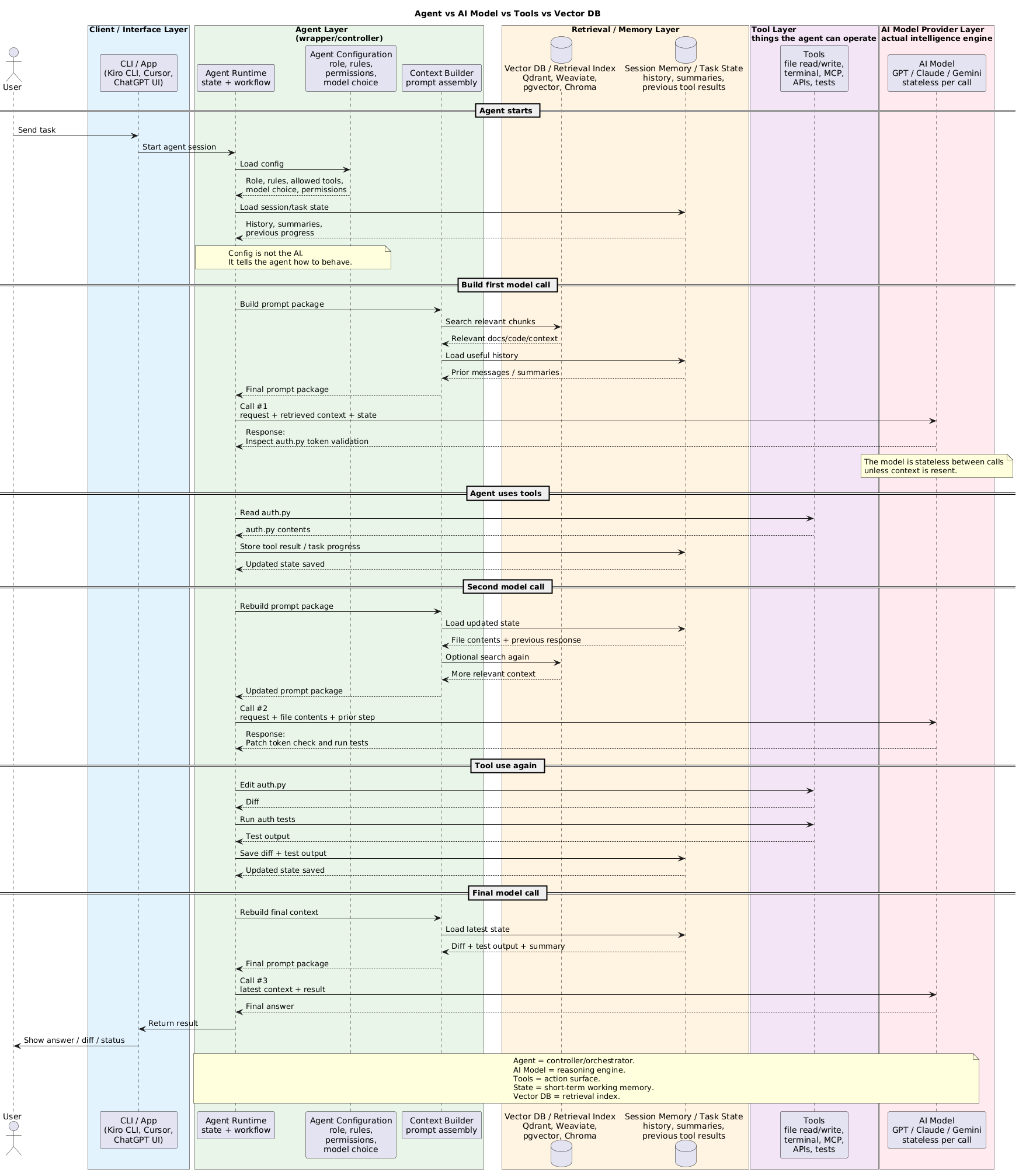
| Diagram lane | Owns |
|---|---|
| Client / Interface | Triggers the task and receives its result or status; it may be a UI, CLI, API, or event source. |
| Agent Layer | Chooses the steps, gathers information for the model, checks proposed actions, calls tools/models, and stops when done. |
| Retrieval / Memory | Supplies searchable documents and saved conversation/task progress. |
| Tool Layer | Runs limited operations such as APIs, database queries, file access, and tests. |
| AI Model Provider | Generates a response or proposes an action for each individual model call. |
2. Client / Interface
This is the entry and return point, not necessarily a screen. A person might start the agent from a web app or CLI; another system might trigger it through an API, queue message, or scheduled event. The result can be shown to a person, returned to the caller, saved as a file, or published as an event.
| Entry / return concern | What it does |
|---|---|
| Trigger | Accept a task from a UI, CLI, API, event, or scheduled job. |
| Identity | Pass a trusted user or workload identity when access is restricted. The agent program and tool backend check permissions before sensitive actions. |
| Long-running task | Save a run ID so the caller can poll or receive a completion event; show progress where a UI exists. |
| Return or approval | Deliver the result to the caller or destination. If approval is needed, collect an authenticated decision before the action runs. |
3. Agent Layer
The Agent Layer is the coordinator in the middle of the diagram. It receives a task, asks the model for help, sends approved actions to tools, remembers the results, and returns an answer. Three separate design questions apply here:
| Question | What it asks |
|---|---|
| Control pattern | Are the steps fixed by the application, chosen by the model as work unfolds, or a mix? |
| Implementation | Do you write the model/tool loop yourself, use a library, or configure a managed loop? |
| Hosting | Where does that program run: your server/Lambda, a managed runtime, or a managed harness? |
These are not three types of agent. A fixed workflow may use an AI model without being an agent. Strands or LangChain can implement an agent loop, while AgentCore Runtime can host the resulting program.
Choose the control mode
The Agent Runtime in the diagram runs the steps. Choose a mode based on whether those steps are known in advance or must be discovered while working.
| Pattern | How it works | Is it an agent? |
|---|---|---|
| Fixed workflow | Application code sets the order: check order → check policy → get approval → issue refund. | Usually no. A model can help with one step, but the program chooses the path. |
| One model/tool call | Model suggests one action; application code checks it and calls the tool once. | Usually no. There is no continuing loop. |
| Agent loop | Model suggests an action, sees the result, then suggests the next one; application code checks each action. | Yes. Use when the next step depends on what the investigation finds. |
| Hybrid | Application code sets mandatory checkpoints; the model chooses how to investigate between them. | An agent operates inside a fixed outer workflow. |
“Application code” means ordinary program logic written by a developer, such as “if the refund exceeds $100, request approval.” An API call may carry out one step, such as looking up an order or issuing the refund. The API call does not decide the order of the steps.
For “Why was my refund rejected?”, an agent may inspect the order, payment, and policy in whichever order the evidence suggests. Before it issues a new refund, application code checks that the order belongs to the user and applies the approval rule. Those required checks come from the business task; a prompt saying “check everything” does not enforce them.
What the controller enforces
| Responsibility | Diagram connection |
|---|---|
| Configuration | Agent Configuration supplies model choice, instructions, allowed tools, permissions, and budgets. |
| Context | Context Builder selects the saved progress and relevant documents to send to the model. |
| Action gate | Runtime checks the tool’s expected input, the user’s permission, business rules, and approval before a tool runs. |
| Loop and stop | Runtime limits steps, time, model usage, tool calls, and spending; it returns a clear completed, partial, approval-needed, or failed status. |
Give the model narrow tools such as “look up order” or “request refund” instead of unrestricted shell, SQL, HTTP, or payment access. A second model review may spot a missed step, but tests and permission checks still decide whether the action is allowed. Anthropic’s workflow and agent distinction.
Choose how to build the loop
The loop is the repeated “ask model → run approved tool → give result back to model” sequence in the diagram. Repeated model calls alone can still be a fixed workflow. In an agent loop, the model can choose the next allowed tool after seeing the previous result. A provider SDK sends model requests; an internal business API such as internal_api.get_order() supplies order data. The examples answer “Why was my refund rejected?” They omit setup and tool definitions; the handwritten loop is conceptual, while the framework calls follow their documented API shapes.
| Approach | Control path | Example code shape |
|---|---|---|
| Direct model call | App → provider SDK/API → model. No loop. Your application chooses the input and makes one request. Useful for: one clear task with little setup. |
|
| Build your own agent | App loop → provider SDK/API → model. Your application code handles model responses, tools, repetition, and stopping rules. Useful for: full control over unusual rules. |
|
| Use an agent SDK | App → agent SDK loop → model API and tools. A library supplies the loop; you provide a model and an authorized order-lookup tool. The model chooses when to call it. Useful for: model-led tool use without writing the loop. See Strands, LangChain, and the OpenAI Agents SDK. |
|
| Define a graph | App → graph → model API and/or agent SDK. A graph library runs steps and branches you specify. LangGraph can call a model or agent within a step. Useful for: required order, branches, and saved progress. |
|
| Configure a managed harness | App → managed harness → model API and tools. AgentCore Harness supplies and runs the loop; you configure model, tools, and limits. Useful for: less loop and hosting code to maintain. |
|
How does each stop? reply.final was only a placeholder; your code must interpret the actual model response.
| Controller | Completion check |
|---|---|
| Your own loop | Map the provider’s status to final, tool request, or error/limit. For example, Bedrock Converse uses stopReason: end_turn finishes the model turn; tool_use means run the requested tool and call again. HTTP 200 only means the API request succeeded. |
| Strands / LangChain | The SDK checks whether the model requested a tool or returned an answer, then repeats or returns. Strands also returns a stop reason for normal completion, limits, cancellation, or errors; LangChain returns when its agent run completes. |
| LangGraph | Your defined route normally reaches END. A node containing an agent has its own tool/answer loop; the graph does not infer that the business task is complete. |
| AgentCore Harness | The service runs the loop and reports messageStop.stopReason, including end_turn, tool use, and exhausted limits. |
These signals say execution stopped, not that the answer is correct. Permissions, required checkpoints, and validation remain application responsibilities.
These are choices you can compose, not five required wrappers: app → Strands → model API, app → LangGraph → LangChain agent → model API, and app → AgentCore Runtime → your agent code → model API are all possible.
LangGraph is a code-based graph runtime: you define nodes and connections in code; it executes them and manages state. Its tooling can visualize the graph, but the graph is not a drag-and-drop builder. LangChain’s create_agent uses LangGraph underneath. For a visual flow builder, see Bedrock Flows.
Hosting is a separate choice. “You run it” means you deploy the program to a server or service and manage its updates and monitoring. AgentCore Runtime can host code written by you or built with Strands/LangGraph; it does not supply the loop. Bedrock Flows is another option for building a known visual workflow, with model, Knowledge Base, Lambda, and Agent steps.
Other agent SDKs include CrewAI and Google ADK. The model provider and retrieval store are separate from all these implementation choices. AWS framework comparison.
Multi-agent: more than one controller
The diagram shows one Agent Runtime. A common extension puts a coordinator agent there that gives specific tasks to specialist agents, then checks and combines their results. Other designs use a fixed sequence or let specialists hand work to one another. Each agent may use its own model, information, tools, and saved progress.
| Pattern | Use when | Example implementation |
|---|---|---|
| Coordinator → specialists | Separate expertise/context helps, and one controller should own the final answer. | Strands agents as tools or LangChain subagents. |
| Defined agent graph | Dependencies and handoffs are known and must be visible. | Strands Graph, LangGraph, or Bedrock Flows when its visual workflow fits. |
| Dynamic handoff | Specialists need to decide which specialist acts next. | Strands Swarm; set explicit limits and ownership. |
Multiple agents add context duplication, latency, cost, failure paths, and permission boundaries. Start with one controller and add specialists when a measured task benefits from separation or safe parallel work.
4. Retrieval / Memory Layer
The diagram contains two different stores. The Vector DB / Retrieval Index searches documents; Session Memory / Task State remembers the current work. The Context Builder selects useful information from both before each model call.
| Store | Holds | Use / caution |
|---|---|---|
| Vector / search index | Document chunks, embeddings, text, and metadata | Retrieve relevant, authorized evidence. HNSW, hybrid search, filters, chunking, and evaluation belong in Knowledge Bases and Retrieval. |
| Session / task state | Recent messages, plan, completed steps, tool results, approvals, and stop reason | Save enough to resume and avoid repeating a change. MemoryDB may fit fast conversation access; DynamoDB or another durable store may track progress and prevent duplicate writes. AWS data/state options. |
| Long-term agent memory | Validated preferences or prior outcomes for later sessions | Record source, owner, timestamp, correction, access, and deletion rules. A vector index can help retrieve memory but does not make it true. |
Orders, balances, and entitlements remain in their authoritative business systems. An agent’s memory is a working record, not a replacement. Save progress around side effects so a retry can determine what already happened.
5. Tool Layer
The arrows to “Read auth.py,” “Edit auth.py,” and “Run tests” cross from Agent Runtime into this layer. Tools execute with real credentials and can cause real side effects.
| Tool interface | Use when | Main check |
|---|---|---|
| Direct function / SDK / API | The agent needs a specific operation, such as getOrder(id) or createTicket(details). |
Check inputs, user permission, timeouts, retries, and whether repeating the call could duplicate a change. |
| MCP server | Several compatible AI clients need to discover and use the same tools through a standard interface. | Check server and user permissions; expose only needed tools; treat returned text as untrusted. MCP is a connection standard, not a safety guarantee. MCP security guidance. |
| File, terminal, browser, or code sandbox | Investigation or development needs an environment to read, edit, or test. | Scope filesystem/network access, command execution, secrets, output size, and irreversible actions. |
Each tool should have a clear name, defined inputs/outputs, useful errors, limited permissions, and a record of what it did. The agent program checks the specific resource and action before execution; a tool description or prompt is not authorization. Strands tool guidance.
6. AI Model Provider Layer
The model receives the assembled request and returns text or a proposed tool call. It does not own the saved task progress, invoke tools by itself, or enforce the application’s permission policy. On the next call, the agent program supplies updated information, including relevant tool results.
| Decision | Reference |
|---|---|
| Model type, provider, context, capabilities, and deployment | AI Models and Providers |
| Personal workload, reasoning effort, pricing, and plan | Model Guidelines |
Use a model capable of the task and evaluate its tool choice, answer quality, latency, and cost in the complete agent workflow; a strong standalone answer does not prove a safe agent.
7. Controls across the lanes
| Failure or question | Owner / response |
|---|---|
| Tool times out after a possible write | Agent Runtime checks the saved record before retrying, so it does not repeat a payment or other change. |
| A step fails after partial progress | Runtime records completed work, undoes it where a safe undo step exists, or returns a partial result for review. |
| A tool response contains hostile instructions | Treat it as data; runtime keeps the tool and model within the configured policy. |
| Loop repeats or exhausts its budget | Runtime stops with an explicit reason instead of calling the model indefinitely. |
| Was the run good? | Trace model proposals, retrieval, policy decisions, tool outcomes, state transitions, and the final answer; evaluate task completion and cost per successful task. |
Evaluation and observability
Test tool selection, argument validity, authorization denial, timeout recovery, prompt injection, termination, and answer grounding together. Reuse retrieval metrics and the shared release gates. Tracing and evaluation span all five lanes; they are not a sixth lane in the diagram.
Continue to AI Infrastructure and Evaluation for platform security, observability, and release controls around these layers.